Figure: 1U SteelFusion Edge Appliance (Front View)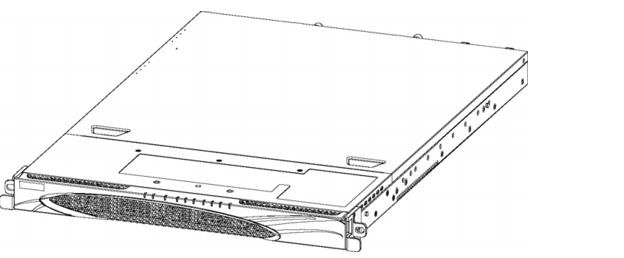

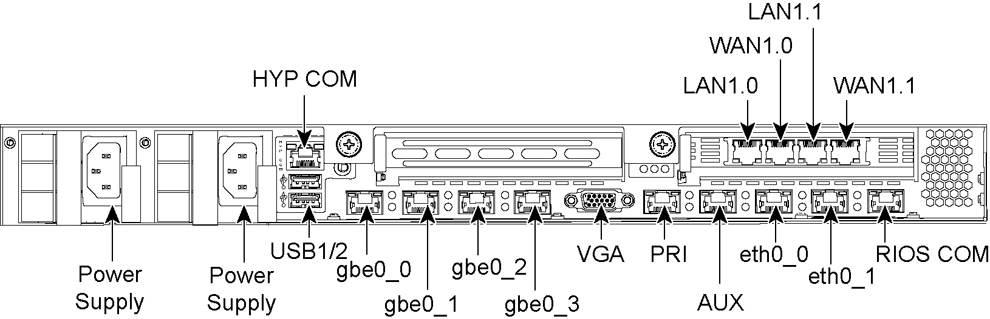
Port | Description |
HYP COM | HYP serial RJ45 COM port manages the hypervisor node. Serial settings: 9600 bps, 8 data bit, 1 stop bit, no parity. |
LAN1.0, WAN1.0, LAN1.1, WAN1.1 | Provides access to the 10/100/1000 Base-TX. • The LAN port connects the system to a LAN switch. • A WAN port connects the system to the WAN router. |
Power Supply | Supplies power to the appliance. |
USB 1, USB 2 | Optional USB ports for hypervisor connectivity. |
gbe0_0, gbe0_1, gbe0_2, gbe0_3 | 1 Gbps interfaces used for hypervisor connectivity. |
VGA | DB15 connector used for hypervisor video connectivity. |
PRI (Primary) | The management interface that connects the SteelFusion Edge to a LAN switch. This management interface enables you to connect to the Management Console and the SteelFusion Edge CLI. The primary and auxiliary ports cannot share the same network subnet. |
AUX (Auxiliary) | An optional port that provides an additional management interface for a secondary network. The primary and auxiliary ports cannot share the same network subnet. |
eth0_0, eth0_1 | Data interfaces that support the use of iSCSI, BlockStream heartbeat, and BlockStream sync. |
RiOS COM | RiOS serial RJ45 COM port manages the RiOS node. Serial setting: 9600 bps, 8 data bit, 1 stop bit, no parity. |
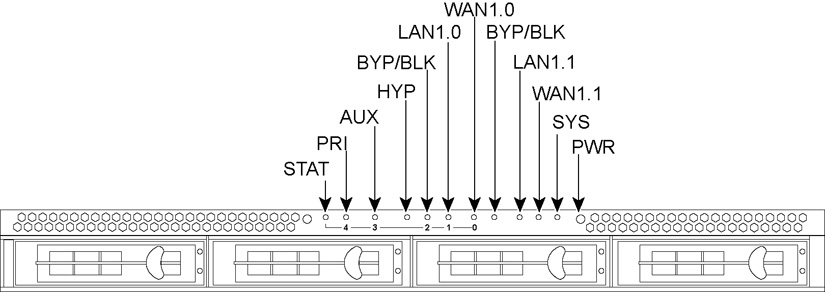
Front Panel LEDs and Buttons | Status |
STAT (Status) | Button (not an LED) |
PRI (Primary) | Link and Traffic = Blinks blue |
AUX (Auxiliary) | Link and Traffic = Blinks blue |
HYP (Hypervisor) | Hypervisor Power On = Blue Hypervisor Power Off = No light |
BYP/BLK BYP (Bypass) BLK = (Block) (Disconnect) | Normal = No Light Bypass or Block (Disconnect) = Orange |
LAN1.0 LAN1.1 | Link and Traffic = Blinking blue |
WAN1.0 WAN1.1 | Link and Traffic = Blinking blue |
SYS (System) | Powering up = Red BIOS POST = Orange Normal = Blue |
PWR (Power) | Button (not an LED) |
HDDs/SSDs | Disk Connected = Blue Read/Write Activity = Blinks Blue Failed Disk = Orange |
Back Panel LEDs and Buttons | Status |
HYP (hypervisor) | Activity = Blinking |
gbe0_x ports | Left LED Link = Green Activity = Blinking green Right LED GB = Orange 100 MB = Green 10 MB = No Light |
PRI (Primary) | Left LED Link = Green Activity = Blinking green Right LED GB = Orange 100 MB = Green 10 MB = No light |
AUX (Auxiliary) | |
LAN-WAN | Left LED Link = Green Activity = Blinking green Right LED GB = Orange 100 MB = Green 10 MB = No light BYP/BLK Normal = No light Bypass or Block (Disconnect) = Orange |
eth0_x ports | Left LED Link = Green Activity = Blinking green Right LED GB = Orange 100 MB = Green 10 MB = No light |
RiOS | Activity = Blinking |