Branch disaster recovery
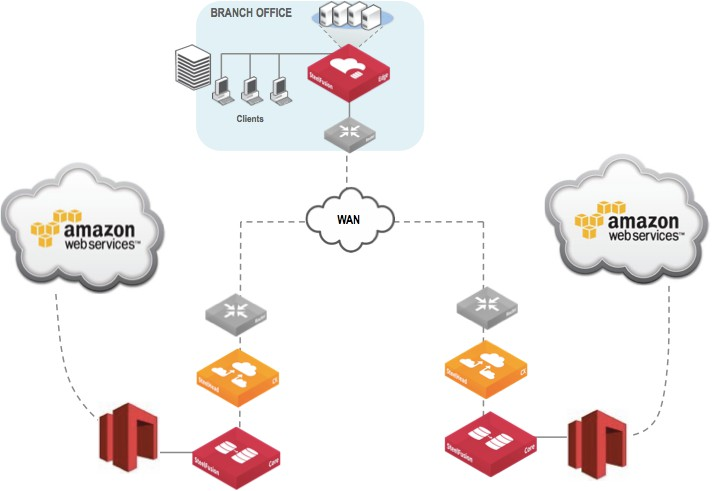
In the unlikely event there is a significant disruption at a branch (such as a natural disaster), the product can be used to quickly recover branch data and services, either to another branch location, or within the data center itself. Since the data is stored within a LUN provided by the AWS Storage Gateway (ASG) device, Core can redirect the LUN from the original branch to another branch with the product. Alternatively, you can directly mount the LUN to a VMware ESXi host in the data center.
A branch outage will result in a crash consistent LUN state to exist for the LUN delivered by the ASG device, to the product, so the amount of data loss will depend on how much pending data the product was in the process of synchronizing to the AWS Storage Gateway LUN at the time the branch outage occurred.
Configuring the LUN to a new Edge at a different branch
Reconfiguring a LUN for access by a new or different Edge is straightforward. Because a branch outage disconnects the ASG device, LUN from the original Edge, Core will need to perform the following steps in order to associate the LUN for use by a new or different Edge.
1. Log in to the Core GUI, and choose Configure > Manage > LUNs.
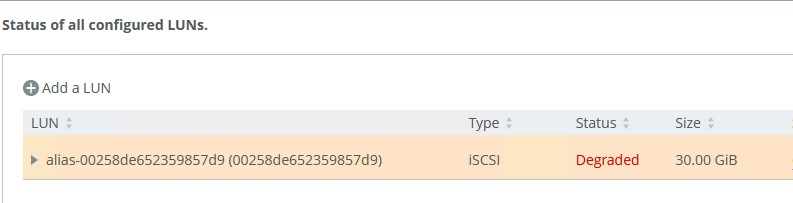
2. Identify the LUNs that are associated with the original Edge that is experiencing the outage, as shown in this figure. Note the LUN name that it has been given (also known as the LUN alias name).
Configured LUNs status
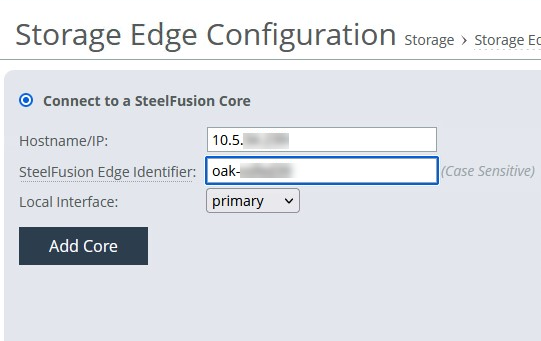
3. Establish the connection between your new Edge device and the Core. Use the same Edge Identifier as your previous Edge; that is, the one that you have lost for reasons such as natural disaster or bad device.
Storage Edge Configuration
4. SSH to the Core management interface, and log in.
5. From the command prompt, issue the following commands to disassociate the previous edge with this serial:
enable
config terminal
edge modify id <original-Edge-name> clear-serial
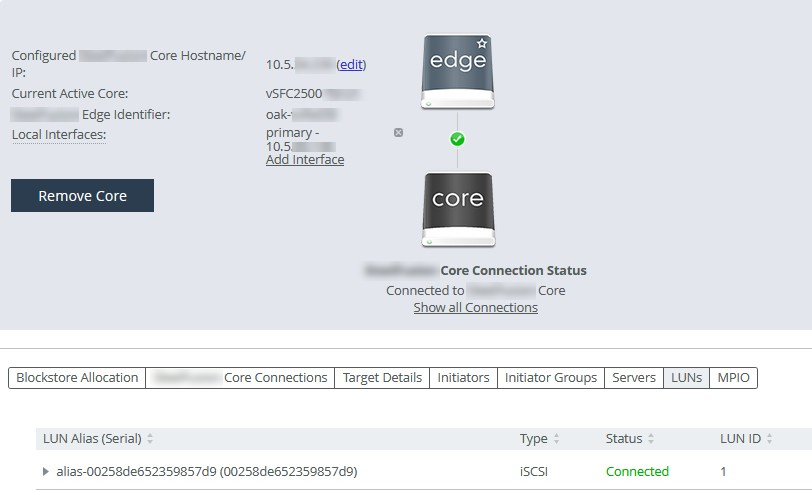
You should now see the LUN on the new Edge.
LUN status
Deploying a new instance of ASG
Performing disaster recovery with an AWS Storage Gateway (ASG) differs slightly from traditional storage disaster recovery since the data or data snapshots are stored in Amazon cloud storage, rather than on another SAN storage device at a disaster recovery site. The benefits of having cloud based snapshots available for recovery is that you do not have to maintain power, networking, and other infrastructure until such time that a disaster recovery is needed. When a disaster recovery event occurs, you can deploy a new virtual instance of an AWS Storage Gateway and the product to perform recovery of required services for branch offices, as shown below This deployment can be done either within a new data center, or within a specialized facility that can use the Amazon Direct Connect features to connect to Amazon cloud storage services directly over high bandwidth networks.
ASG deployment
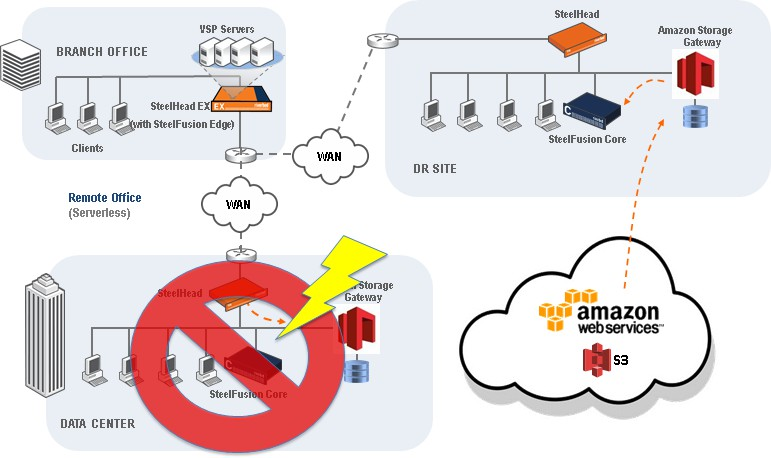
Disaster recovery with the AWS Storage Gateway and the product
Deploy a new AWS Storage Gateway at the disaster recovery site, similar to the steps outlined in the “Deploying the AWS Storage Gateway” section above. However, instead of deploying a new volume for the AWS Storage Gateway, you will configure the new volume as a recovered volume from a previous snapshot.
Configure volume
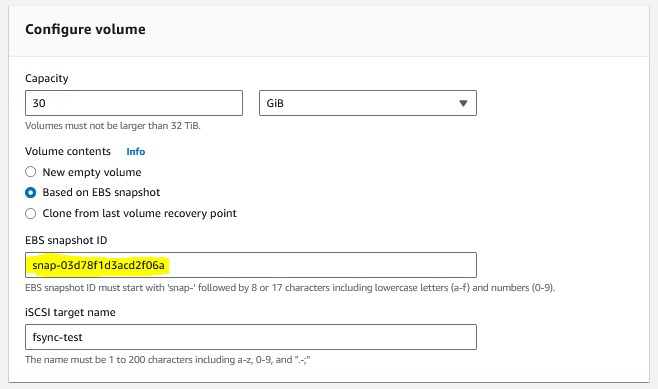
After recovering the AWS Storage Gateway, you will need to deploy a new Core, as outlined earlier. When adding the iSCSI target and LUN, you will point to the new iSCSI target and attach to the new LUN delivered by the disaster recovery AWS Storage Gateway and provide initiator access to the correct host(s) at the branch which will need access (for example, Edge).
If you want to recover data from the LUN directly in the data center, you may mount the LUN directly to a Windows or ESXi host as described in the sections Error! Reference source not found. and Error! Reference source not found. The product is not required in this case and data can be directly recovered via Windows or VMware iSCSI connections to the LUN.
When data access occurs (such as from an ESXi server at the branch launching a VM delivered via the product), the product will make requests for the data from the AWS Storage Gateway, and deliver that received data from the recovered snapshot to the product across the WAN to the branch Edge.
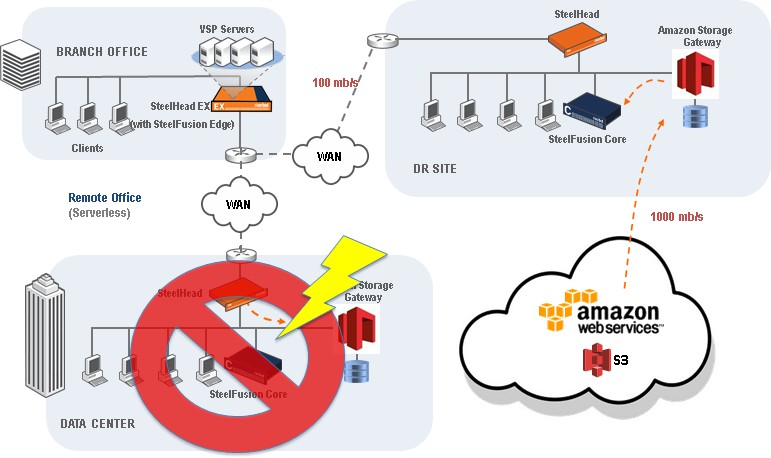
The data recovery time will depend on your WAN speed between Amazon S3 and your Core, and the WAN speed between your Core and your edge. For example, if your Core is on a 1 gb/s Direct Connect link to Amazon S3, your recovery time will most likely depend on the WAN speed at which the product traffic can pass from the disaster recovery site to the branch. In the below example, a 100mb/s WAN to the branch could yield a Windows VM boot time of roughly 20 to 30 minutes. Alternatively, your disaster recovery procedures may dictate to recover the branch environment at the disaster recovery site, rather than at the branch, which could reduce the amount of time needed to initially recover services and bring them online for users.
Data recovery time
Data center disaster recovery with FusionSync
A single data center is susceptible to large-scale failures (power loss, natural disasters, hardware failures) that can bring down your network infrastructure. To mitigate such scenarios, Replication enables you to connect branch offices to data centers across geographic boundaries and replicate data between them. FusionSync enables Cores in two data centers to remain in synchronization and enables the Storage Edges to switch to another Core in case of disaster and prevent data loss and downtime. This protects from data loss in case of a data center failure and from network downtime that can affect many branch offices at the same time.
For more information on how to set this up, refer to the design guide.
Disaster recovery