Right riser slots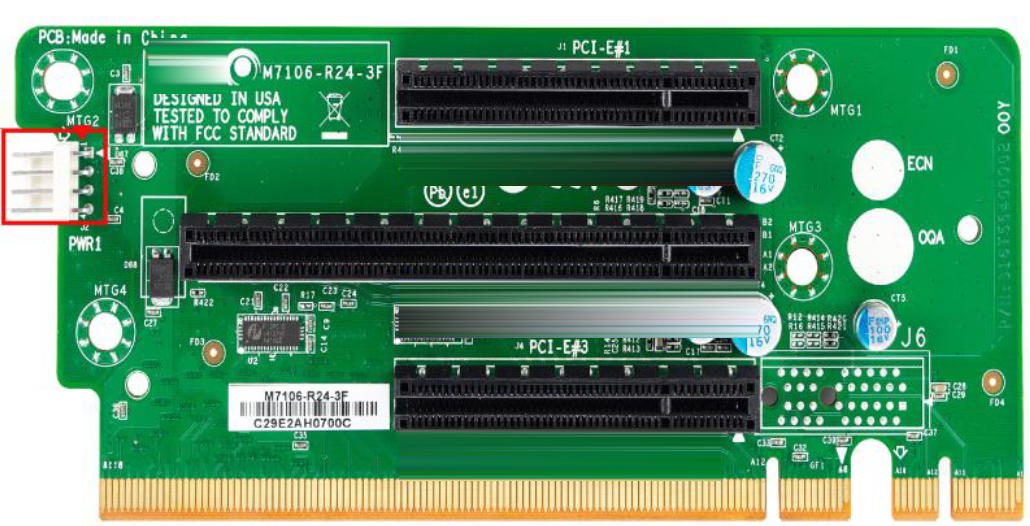
NIC name and size | Manufacturing part no. | Orderable part no. | Appliances |
|---|---|---|---|
Two-Port 100-GbE Fiber LR4 FH9.5 | 410-00248-01 | NIC-1-100G-2LR4-BP | Interceptor 9800 |
Two-Port 100-GbE Fiber SR4 FH9.5 | 410-00247-01 | NIC-1-100G-2SR4-BP | Interceptor 9800 |
Two-Port 40-GbE Fiber LR4 FH9.5 | 410-00194-01 | NIC-1-040G-2LR4-BP | SteelHead 5080 SteelHead 6090 SteelHead 7080 SteelHead 8090 SteelHead GX 10000 Interceptor 9600 Interceptor 9800 |
Two-Port 40-GbE Fiber SR4 FH9.5 | 410-00193-01 | NIC-1-040G-2SR4-BP | SteelHead 5080 SteelHead 6090 SteelHead 7080 SteelHead 8090 SteelHead GX 10000 Interceptor 9600 Interceptor 9800 |
Four-Port 10-GbE Copper FH9.5 | 410-00195-01 | NIC-1-010G-4TX-BP | SteelHead 5080 SteelHead 7080 SteelHead GX 10000 |
Four-Port 10-GbE DAC FH7.6 | 410-00197-01 | NIC-1-010G-DAC-BP | SteelHead 3080 SteelHead 5080 SteelHead 7080 SteelHead GX 10000 |
Four-Port 10-GbE Fiber LR FH7.6 | 410-00190-01 | NIC-1-010G-4LR-BP | SteelHead 3080 SteelHead 4090 SteelHead 5070 SteelHead 5080 SteelHead 6090 SteelHead 7070 SteelHead 7080 SteelHead 8090 SteelHead GX 10000 Interceptor 9600 Interceptor 9800 |
Four-Port 10-GbE Fiber SR FH7.6 | 410-00191-01 | NIC-1-010G-4SR-BP | SteelHead 3080 SteelHead 4090 SteelHead 5070 SteelHead 5080 SteelHead 6090 SteelHead 7070 SteelHead 7080 SteelHead 8090 SteelHead GX 10000 Interceptor 9600 Interceptor 9800 |
Two-Port 10-GbE TX Copper | 410-00094-01 | NIC-1-010G-2TX | SteelFusion |
Four-Port 1-GbE Copper Base-T HHHL | 410-00115-01 or -11 | NIC-1-001G-4TX-BP | SteelFusion Core 3500 SteelHead 2090 SteelHead 3070 SteelHead 3080 SteelHead 4090 SteelHead 5070 SteelHead 5080 SteelHead 6090 SteelHead 7070 SteelHead 7080 SteelHead 8090 SteelHead GX 10000 Interceptor 9600 |
Four-Port 1-GbE Fiber LX FHHL | 410-00123-01 | NIC-1-001G-4LX-BP | SteelHead 3070 SteelHead 3080 SteelHead 4090 SteelHead 5070 SteelHead 5080 SteelHead 6090 SteelHead 7070 SteelHead 7080 SteelHead 8090 Interceptor 9600 Interceptor 9800 |
Four-Port 1-GbE Fiber SX FHHL | 410-00122-01 | NIC-1-001G-4SX-BP | SteelHead 3070 SteelHead 3080 SteelHead 4090 SteelHead 5070 SteelHead 5080 SteelHead 6090 SteelHead 7070 SteelHead 7080 SteelHead 8090 SteelHead GX 10000 Interceptor 9600 Interceptor 9800 |
Two-Port 1-GbE Fiber LX HHHL | 410-00114-01 | NIC-1-001G-2LX-BP | SteelHead 3070 SteelHead 5070 SteelHead 7070 Interceptor 9600 |
Two-Port 1-GbE Fiber SX HHHL | 410-00113-01 | NIC-1-001G-2SX-BP | SteelHead 3070 SteelHead 5070 SteelHead 7070 Interceptor 9600 |
Two-Port TX 1-GbE Copper | 410-00043-01 | NIC-001-2TX | SteelHead 150, 250, 550, 555 |
Four-Port TX 1-GbE Copper | 410-00044-01 | NIC-002-4TX | SteelHead 555, 755, 1555, 5055, 7055 |
QuickAssist Technology (QAT) Compression/Acceleration HHHL | 410-00246-01 | QAT-COMP-SP | SteelHead 7080 |
10-Gbps Compression Offload FHHL | 410-00055-02 | OFL-1-CMP-2 | SteelHead GX 10000 |
5-Gbps Compression Offload HHHL | 410-00303-02 | OFL-1-CMP-1 | SteelHead 7070 |
SteelHead CX 6090 and 8090 supported NICs | Quantity | Supported slots |
|---|---|---|
40GbE | 2 | Slots 2 and 4. These cards can be installed in slots 2 and 4. |
10 GbE | 4 | Slots 1, 2, 4 and 5. These cards can be installed in slots 1, 2, 4, and 5 and cannot be installed in slots 3 and 6 due to hardware restrictions. |
1 GbE | 5 | Slots 1, 2, 4, 5, and 6. These cards can be installed in slots 1, 2, 4, 5, and 6. |
SteelHead CX 4090 supported NICs | Quantity | Supported slots |
|---|---|---|
10 GbE | 1 | Slot 2. These cards can be installed in slot 2. |
1 GbE | 1 | Slot 2. These cards can be installed in slot 2. |
SteelHead CX 5080 and 7080 supported NICs | Quantity | Supported slots |
|---|---|---|
40 GbE | 2 | Slots 2 and 4. These cards require two slots due to their larger size and need for a x16 bus width PCIe slot. They can be installed in slot 2 (slot 1 will be blocked) and/or slot 4 (slot 5 will be blocked). |
10 GbE | 4 | Slots 1, 2, 4, and 5. These cards can be installed in slots 1, 2, 4, and 5 but cannot be installed in slots 3 and 6 due to hardware restrictions. |
1 GbE | 6 | Slots 1, 2, 3, 4, 5, and 6. These cards can be installed in slots 1 to 6. If a QAT Compression/Acceleration card is installed in slot 6, you lose that slot. |
QAT Compression/Acceleration | 1 | Slot 6 only. The QAT Compression/Acceleration card can only be installed in the CX 7080 appliance, slot 6. |
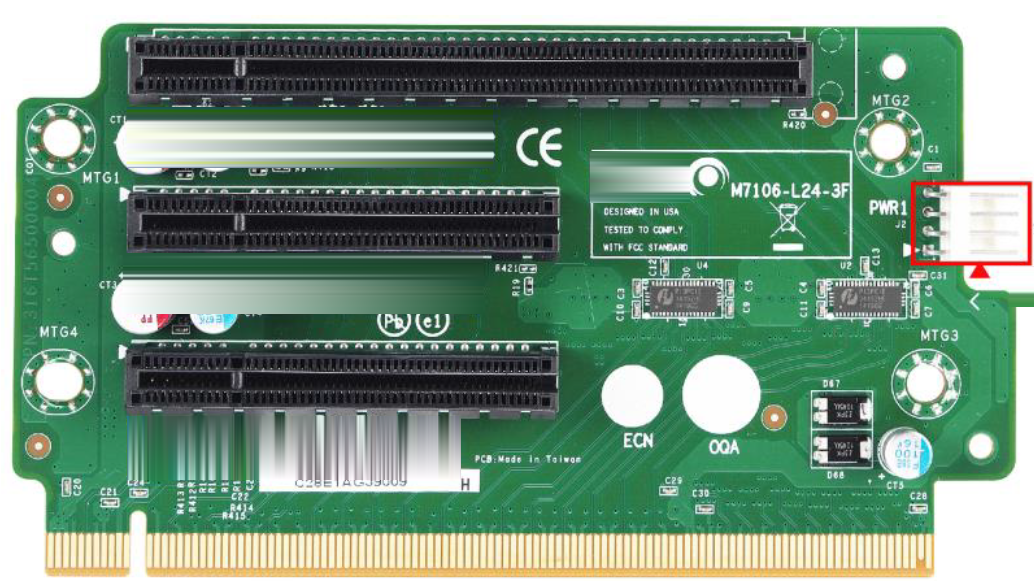
Slot no. | Bus width | Height | Length | Notes |
|---|---|---|---|---|
Slot 1 | x8 | FH (Full-Height) | FL (Full-Length) | When a x16 card is in slot 2, slot 1 can’t be used. |
Slot 2 | x16 or x8 | FH (Full-Height) | FL (Full-Length) | When a x16 card is in slot 2, slot 1 can’t be used. Two-Port 40-GbE Fiber SR4/LR4 cards require x16 bus width slots and are only supported in slots 2 and 4. |
Slot 3 | x8 | FH (Full-Height) | HL (Half-Length <= 6.6 in.) | SteelHead CX 5080 and CX 7080 appliances ship with a Four-Port 1-GbE Copper Bypass card installed in slot 3. |
Slot no. | Bus width | Height | Length | Notes |
|---|---|---|---|---|
Slot 4 | x16 or x8 | FH (Full-Height) | FL (Full-Length) | When a x16 card is in slot 4, slot 5 can’t be used. Two-Port 40-GbE Fiber cards require a x16 bus width PCIe slot and are only supported in slots 2 and 4. |
Slot 5 | x8 | FH (Full-Height) | FL (Full-Length) | When a x16 card is in slot 4, slot 5 can’t be used. |
Slot 6 | x8 | See notes. | HL (Half-Length <= 6.6 in.) | Half-Height: CX 7080 ships with a 3008-8i HBA mezzanine card preinstalled. The CX 7080 requires this mezzanine card for internal PCIe and IO expansion. The CX 5080 doesn’t require a mezzanine card. Full-Height: The CX 5080 is full-height NIC compatible when a mezzanine card isn’t installed. The QAT Compression/Acceleration card can be installed in slot 6. Two Mini-SAS-HD cables connect the 3008-8i HBA mezzanine card and the backplane connectors. If these cables are bad or loose, the SSDs won’t function properly. If the 3008-8i HBA mezzanine card fails, the system won’t recognize the SSDs. |
Interceptor 9800 supported NICs | Quantity | Supported slots |
|---|---|---|
100 GbE | 2 | Slots 2 and 4. (Two-Port 100-GbE cards require a x16 bus width PCIe slot and are only supported in slots 2 and 4.) When a 100-GbE card is installed in slot 2, slot 1 is unusable. When a 100-GbE card is installed in slot 4, slot 5 is unusable. |
40 GbE | 2 | Slots 2 and 4. (Two-Port 40-GbE cards require a x16 bus width PCIe slot and are only supported in slots 2 and 4.) When a 40-GbE card is installed in slot 2, slot 1 is unusable. When a 40-GbE card is installed in slot 4, slot 5 is unusable. |
10 GbE | 4 | Slots 1, 2, 4, and 5. (hardware restriction in slot 3 and slot 6). |
1 GbE Fiber SX | 4 | Slots 1, 2, 3, 4, 5, and 6. No slot restrictions. |
Supported NICs | Quantity | Supported slots |
|---|---|---|
SteelHead GX 10000 | ||
1 GbE | 4 | 1, 2, 4, 5 (compression card in slots 3 and 6) |
10 GbE | 2 | 1, 2 (hardware restriction in slots 4 and 5; compression cards in slots 3 and 6) |
40 GbE | 2 | 1, 2 (compression card in slots 3 and 6) |
SteelHead CX5070 | ||
1 GbE | 6 | 1, 2, 3, 4, 5, 6 |
10 GbE | 4 | 1, 2, 3, 6 (hardware restriction in slots 4 and 5) |
40 GbE | 2 | 1, 2 |
SteelHead CX7070 | ||
1 GbE | 5 | 1, 2, 4, 6 (compression card in slot 3) |
10 GbE | 3 | 1, 2, 6 (compression card in slot 3; hardware restrictions slots 4 and 5) |
40 GbE | 2 | 1, 2 (compression card in slot 3) |
SteelHead CX3070 | ||
10GbE (fiber SR, redirector) | 2 | Slots 2 and 3 (Slot 1 is reserved for the default bypass card and it only takes a half-height card.) |
Interceptor 9600 | ||
1 GbE | 6 | 1, 2, 3, 4, 5, 6 |
10 GbE | 4 | 1, 2, 3, 6 |
40 GbE | 2 | 1, 2 |
Product | Slot guidelines |
|---|---|
SteelHead CX 5070, CX 7070 | • Appliances ship with a four-port 1-GbE copper bypass card installed in slot 1. • The preferred order for populating slots is 2, 3 (if available), 6, 5, and 4. • Install 10-GbE NICs before 1-Gbps NICs when following the preferred slot order. (The preinstalled NIC will always remain in slot1.) • Compression cards must be installed in slot 3. (The CX 7070H also includes a preinstalled compression card in slot 3.) |
SteelHead GX 10000 | • GX 10000 appliances don’t ship with any data NICs installed. If you preorder a data NIC, it will be installed in slot 1. The GX 10000 ships with two compression cards in slots 3 and 6. • The preferred order for populating slots is 2, 4, and 5. • Install 10-GbE cards before 1-GbE cards when following the preferred slot order. You can install a maximum of two 10-GbE NICs in slots 1 and 2. • 10-GbE cards must be installed in slots 1, 2, 3, or 6; don’t install in slots 4 or 5. Install 10-GbE cards before 1-GbE cards when following the preferred slot order. • 40-GbE cards must be installed in slot 1 or 2; don’t install in slots 3, 4, 5, or 6. |
Interceptor 9600 | • Appliances ship with a four-port 1-GbE copper bypass card installed in slot 1. You can install a maximum of six 1-GbE NICs in slots 1 to 6 in IC 9600. • The preferred order for populating slots is 2, 3 (if available), 6, 5, and 4. • Install 10-GbE NICs before 1-Gbps NICs when following the preferred slot order. (The preinstalled NIC will always remain in slot1.) • 10-GbE NICs must be installed in slots 1, 2, 3, or 6; don’t install in 4, 5. Install 10-GbE NICs before 1-Gbps NICs when following the preferred slot order. You can install a maximum of four 10-GbE NICs in IC 9600. • IC 9600 supports four 10-GbE network add-on cards. The 1 GbE card in slot 1 must be relocated to slot 4 or 5. • 40-GbE NICs must be installed in slots 1 or 2; don’t install in 3, 4, 5, or 6. You can install a maximum of two 40-GbE NICs in IC 9600. |