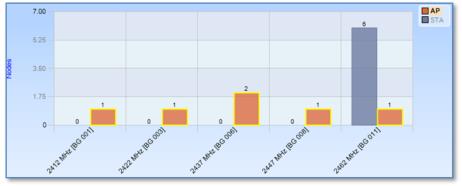
Stacked Bar Chart
A Stacked Bar Chart is similar to a Single Bar Chart except that each column is subdivided into predetermined constituents. These constituent components can be selected and analyzed individually or collectively.
Along with the “Sampling Time” and “Data Retention Time” options previously described, the Stacked Bar Chart is customizable in the following ways using the chart context menu:
◼ Sort Bars
◼ Toggle of legend visibility
◼ Toggle of label visibility above individual bars
◼ Select value or percentage as label
Default
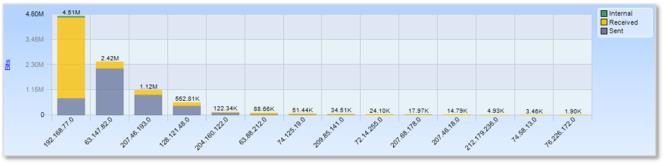
This is an example of the default view for a Stacked Bar Chart:
Stacked Bar Chart
Selection
A bar in a Stacked Bar Chart is selected by clicking on the bar itself, its column, or its representation in the legend. Clicking with the Control key pressed is supported for multiple selection.
Grouped Bar Chart
A Grouped Bar Chart is similar to a Single Bar Chart except that each column is subdivided into two or more sub columns.
Along with the “Sampling Time” and “Data Retention Time” options previously described, the Grouped Bar Chart is customizable in the following ways using the chart context menu:
◼ Sort Bars
◼ Toggle legend visibility
◼ Toggle label visibility above individual bars
◼ Select value or percentage as label
Default
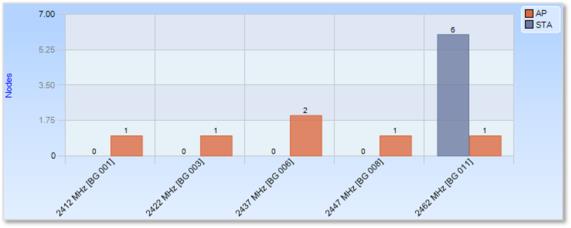
This is an example of the default view for a Grouped Bar Chart:
Grouped Bar Chart
Selection
Selection of the Grouped Bar Chart can happen three ways:
◼ Selection of a column.
◼ Selection of one of the components of a column.
◼ Selection of all instances of a certain subcomponent across all columns.
Column
A column based selection selects all data corresponding to the column. This method of selection is achieved by selecting the area around the bar with respect to the desired column inside the chart, but not the bar itself.
Grouped Bar Chart Selection (Column)
Component Instance
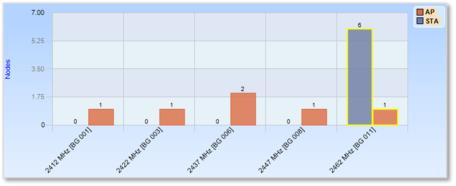
A component instance based selection selects a subset of the data in a particular column. This method of selection is achieved by clicking on the component.
Grouped Bar Chart Selection (Component Instance)
Component
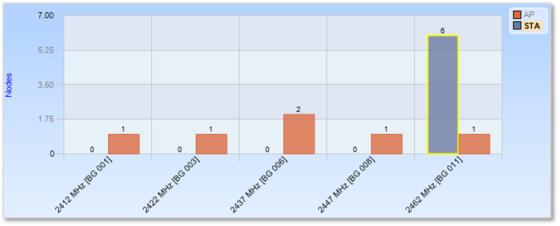
A component based selection selects data in all columns for a particular component subset. This method of selection is achieved by clicking on the representation of the component in the legend.
Grouped Bar Chart Selection (Component)