Right riser slots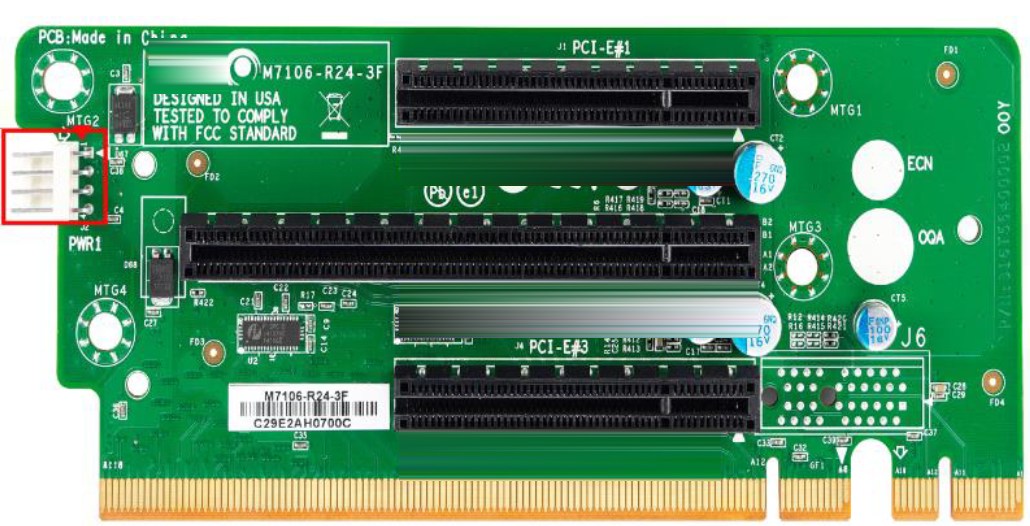
SteelHead CX 5080 and 7080 supported NICs | Quantity | Supported slots |
40 GbE | 2 | 2, 4 These cards require two slots due to their larger size and can be installed in slot 2 (slot 1 will be occluded) and/or slot 4 (slot 5 will be occluded). |
10 GbE | 4 | 1, 2, 4, 5 These cards can be installed in slots 1, 2, 4, 5 and cannot be installed in slots 3 and 6 due to hardware restrictions. |
1 GbE | 6 | 1-6. These cards can be installed in slots 1 to 6. If a QAT Compression/Acceleration card is installed in slot 6, you loose that slot. |
QAT Compression/Acceleration | 1 | 6 only. The QAT Compression/Acceleration card can only be installed in the CX xx80 appliance, slot 6. |
Slot # | Bus width | Height | Length | Notes |
Slot 1 | x8 | FH (Full-Height) | FL (Full-Length) | When a x16 card is in slot 2, slot 1 can’t be used. |
Slot 2 | x16 or x8 | FH (Full-Height) | FL (Full-Length) | When a x16 card is in slot 2, slot 1 can’t be used. Two-Port 40-GbE Fiber SR4/LR4 cards require x16 bus width slots and are only supported in slots 2 and 4. |
Slot 3 | x8 | FH (Full-Height) | HL (Half-Length <= 6.6 in.) | SteelHead CX 5080 and CX 7080 appliances ship with a Four-Port 1-GbE Copper Bypass card installed in slot 3. |
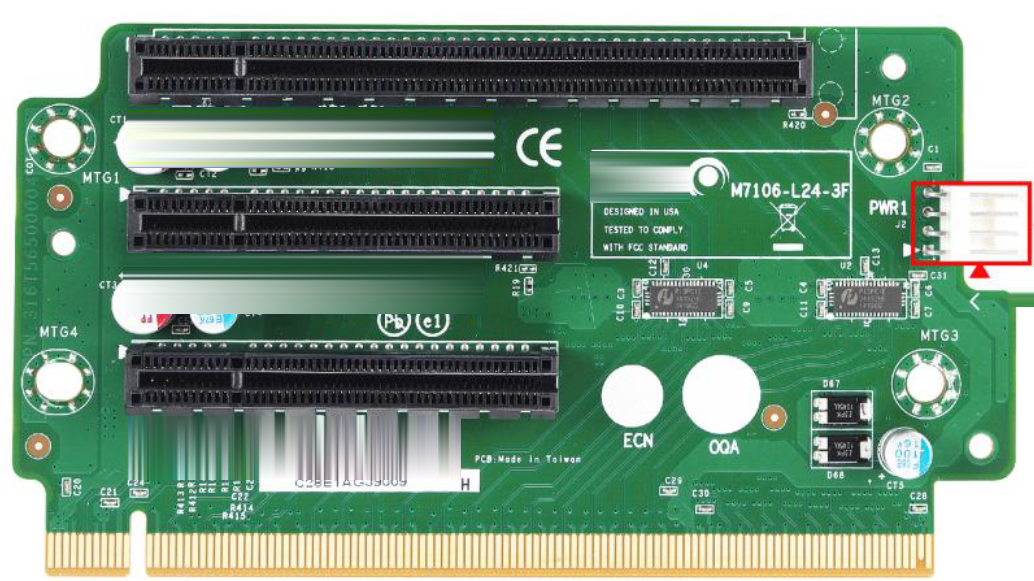
Slot # | Bus width | Height | Length | Notes |
Slot 4 | x16 or x8 | FH (Full-Height) | FL (Full-Length) | When a x16 card is in slot 4, slot 5 can’t be used. Two-Port 40-GbE Fiber cards are only supported in slot 2 and 4 due to their larger size. |
Slot 5 | x8 | FH (Full-Height) | FL (Full-Length) | When a x16 card is in slot 4, slot 5 can’t be used. |
Slot 6 | x8 | See notes. | HL (Half-Length <= 6.6 in.) | Half-Height: CX 7080 ships with a 3008-8i HBA mezzanine card preinstalled. The CX 7080 requires this mezzanine card for internal PCIe and IO expansion. The CX 5080 doesn’t require a mezzanine card. Full-Height: The CX 5080 is full-height NIC compatible when a mezzanine card isn’t installed. The QAT Compression/Acceleration card can be installed in slot 6. Two Mini-SAS-HD cables connect the 3008-8i HBA mezzanine card and the backplane connectors. If these cables are bad or loose, the SSDs won’t function properly. If the 3008-8i HBA mezzanine card fails, the SSDs won’t be recognized. |
Interceptor 9800 supported NICs | Quantity | Supported slots |
100 GbE | 2 | 2, 4 (Two-Port 100-GbE cards are only supported in slot 2 and 4 due to their larger size.) When a 100-GbE card is installed in slot 2, slot 1 is unusable. When a 100-GbE card is installed in slot 4, slot 5 is unusable. |
40 GbE | 2 | 2, 4 (Two-Port 40-GbE cards are only supported in slot 2 and 4 due to their larger size.) When a 40-GbE card is installed in slot 2, slot 1 is unusable. When a 40-GbE card is installed in slot 4, slot 5 is unusable. |
10 GbE | 4 | 1, 2, 4, 5 (hardware restriction in slot 3 and slot 6). |
1 GbE SX | 4 | 1, 2, 3, 4, 5, 6 No slot restrictions. |
SteelCentral product | Slot restrictions |
SteelCentral AppResponse 4180 | Only install NICs in slots 2 and 3, populating slot 2 first. The appliance is equipped with preinstalled RAID cards. Do not move or remove the RAID cards located in slots 4, 5, and 6. |
SteelCentral AppResponse 8180 | You can install 1-GbE and 10-GbE NICs in slots 2 and 3, populating slot 2 first. For 40-GbE and 100-GbE NICs, the NIC must be installed in slot 2. Slot 3 can only be populated with a 1-GbE or 10-GbE NIC. The appliance is equipped with preinstalled RAID cards. Do not move or remove the RAID cards located in slots 4, 5, and 6. |
SteelCentral NetProfiler 4280 | The Two-Port Fiber Channel HBA (SAN) 4/8/16-GbE card must be installed in slot 2. |
SteelCentral NetProfiler 8280 EXP | The Two-Port Fiber Channel HBA (SAN) 4/8/16-GbE card must be installed in slot 2. |
SteelCentral Flow Gateway 2280 | You can install an additional two-port 10-GbE card in slots 2. |