SteelFusion Edge appliance architecture
The Edge hardware platform contains two distinct computing nodes within a single chassis: hypervisor node and RiOS node. The physical node design provides true hardware resource separation and isolation. These two computing nodes are connected through Gbps Ethernet interconnects that allow both nodes to communicate for management, networking, and storage data.
Figure: SteelFusion Edge architecture
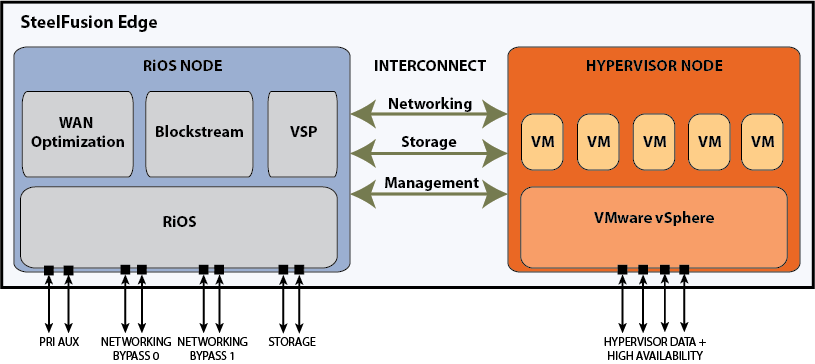
Each node has its own resources. For example each node has its own sensors for temperature, voltage, and DIMMs. Storage for the hypervisor node is provided from the RiOS node via the Gbps interconnects using iSCSI.
Hypervisor node
The hypervisor node is a bare-metal virtualization platform that enables you to run multiple VMs on the Edge appliance. With the hypervisor node, you can consolidate multiple basic services in the branch such as Active Directory (AD), Domain Name Service (DNS), print server, and file server. You install and run VMs directly from the hypervisor node of the Edge appliance.
The hypervisor uses the ESXi 5.5U3a software as the virtualization platform. The hypervisor is included in the Edge appliance and does not require a separate download. After you install the Edge appliance, you set up the hypervisor using the Edge Management Console Installer.
You set up and configure VMs through the VMware vSphere Client or a licensed vCenter. You must install the VMware vSphere Hypervisor Client, which enables monitoring and management of a single instance of the ESX or ESXi server. You can download the vSphere applications from the VMware website, or you can download the vSphere Client from the hypervisor host.
The hypervisor node enables you to connect to the hypervisor serial console using the RiOS CLI command hypervisor console. You can also perform debugging by connecting via Secure Shell (SSH) to the hypervisor baseboard management controller (BMC) internal IP address. For detailed information, see the SteelFusion Command-Line Interface Reference Manual and the SteelFusion Edge Hardware and Maintenance Guide.
RiOS node
The RiOS node incorporates SteelHead RiOS 9.1.2 features to provide WAN optimization. All features available with RiOS 9.1.2 are available on the Edge appliance. You manage the storage and networking components using the SteelFusion Management Console, and you utilize VMware vSphere Client or vCenter to interact with the hosted VMs.
The RiOS node also includes the VSP management software for virtualization.
The RiOS node provides BlockStream iSCSI storage for the hypervisor datastores. You configure the space allotted to the BlockStream iSCSI storage using the SteelFusion Management Console Hypervisor Installer. For detailed information about the Hypervisor Installer, see the SteelFusion Edge Management Console User’s Guide.
Networking interfaces
The Edge hardware platform includes:
• Management interfaces - Management network ports for the RiOS node are provided using the primary (PRI) and auxiliary (AUX) interfaces.
• SteelHead bypass interfaces - SteelHead bypass ports are provided on the RiOS node through a preinstalled network interface card (NIC) (LANX_Y, WANX_Y).
• Storage interfaces - Storage ports for external iSCSI or high availability connections for SteelFusion are provided on the RiOS node via the storage ports (eth0_0, eth0_1).
• Hypervisor data interfaces - For the hypervisor node, any of the four data ports labeled gbe0_0, gbe0_1, gbe0_2, and gbe0_3 can be used for virtualization depending on the hypervisor configuration. You configure these ports during the initial configuration using the Edge Management Console Hypervisor Installer and manage them using VMware vSphere Client or vCenter.