Replacing a certificate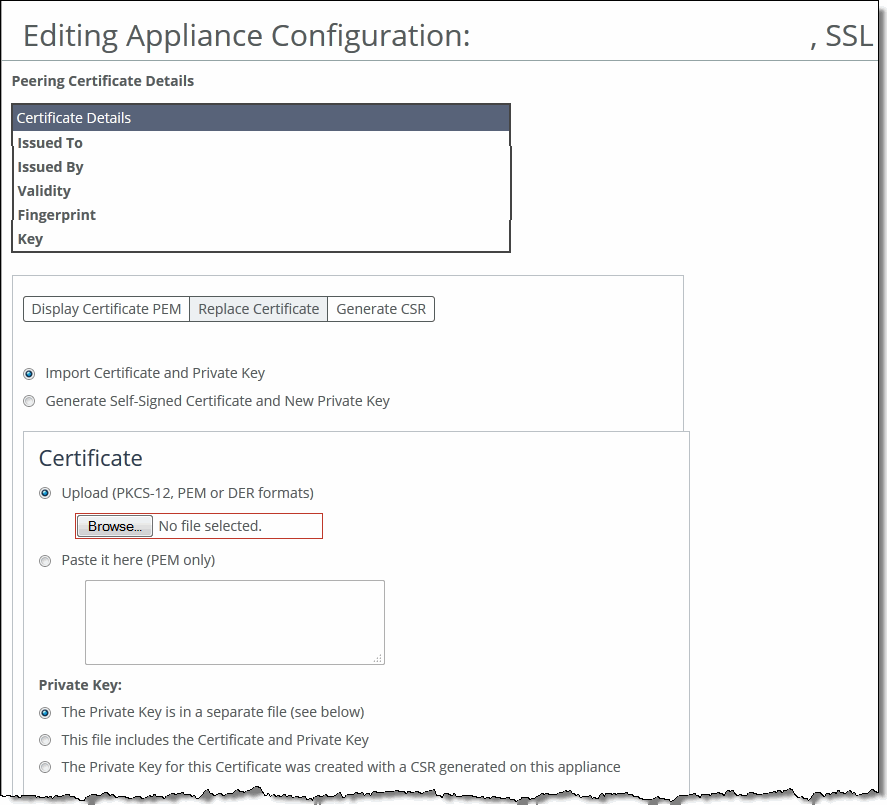
Control | Description |
Import Certificate and Private Key | Imports the certificate and key. The page displays controls for browsing to and uploading the certificate and key files. You can also use the text box to copy and paste a PEM file. The private key is required regardless of whether you’re adding or updating the certificate. |
Certificate | • Upload—Browse to the local file in PKCS-12, PEM, or DER formats. • Paste it here (PEM)—Copy and then paste the contents of a PEM file. |
Private Key | Select the private key origin. • The Private Key is in a separate file (see below)—You can either upload it or copy and paste it. • This file includes the Certificate and Private Key • The Private Key for this Certificate was created with a CSR generated on this appliance |
Separate Private Key | • Upload (PEM or DER formats)—Browse to the local file in PEM or DER formats. • Paste it here (PEM only)—Paste the contents of a PEM file. • Decryption Password—Specify the decryption password, if necessary. Passwords are required for PKCS-12 files, optional for PEM files, and never needed for DER files. |
Import Certificate and Key | Imports the certificate and key. |
Generate Self-Signed Certificate and New Private Key | Select this option to generate a new private key and self-signed public certificate. The page displays controls to identify and generate the new certificate and key. |
Common Name—Specify the common name of a certificate. To facilitate configuration, you can use wildcards in the name: for example, *.example.com. If you have three origin servers using different certificates, such as webmail.example.com, internal.example.com, and marketingweb.example.com, on the server-side SteelHeads, all three server configurations can use the same certificate name *.example.com. | |
Organization Name—Specify the organization name (for example, the company). | |
Organization Unit Name—Specify the organization unit name (for example, the section or department). | |
Locality—Specify the city. | |
State (no abbreviations)—Specify the state. | |
Country (2-letter code)—Specify the country (2-letter code only). | |
Email Address—Specify the email address of the contact person. | |
Validity Period (Days)—Specify how many days the certificate is valid. | |
Private Key | Cipher Bits—Select the key length from the drop-down list. The default is 1024. |
Generate Certificate and Key | Generates certificate and key. |